
I still remember the first time I saw a teammate pull off the BiSH emote in a pre-match lobby—it was chaotic, flashy, and instantly became my favorite way to taunt opponents. Fast forward to 2026, and I'm pretty amazed that this classic Epic emote is still making waves. Whether you're a veteran who missed it back in 2020 or a fresh recruit who just installed Call of Duty Mobile, there’s a chance you can still grab the BiSH emote for free. I recently stumbled upon a redeem code that, according to several active community members, still works in certain regions. So, I decided to put together this guide based on my own successful redemption and everything I've gathered from forums and social media.
Wait, What Exactly Is the BiSH Emote?
The BiSH emote is a high-energy, Epic-rarity dance move that instantly adds personality to your character. It’s not just a simple wave or thumbs-up—it's a full-body performance that practically screams confidence. I've noticed it’s especially popular in Battle Royale victory screens and during Search & Destroy clutch moments. There's just something about pulling off that move after wiping an enemy squad that makes the whole match feel more rewarding. Plus, since it originally released around the first anniversary, owning it gives you a bit of old-school bragging rights among newer players.
The Redeem Code That Still Sparks Hope
When the BiSH emote first dropped in October 2020, the code BFNGZCZ5EM was shared widely by data miners and news accounts. Over time, many assumed it had expired. However, earlier this year I saw a Reddit thread where multiple users confirmed the code worked again—apparently tied to a silent Anniversary throwback event. Naturally, I sprinted to the redemption center to test it myself, and to my surprise, the emote popped up in my in-game mail a few hours later. Your mileage may vary, but it’s absolutely worth a shot before the window closes (again).
How I Redeemed the BiSH Emote in 2026
Let me walk you through the exact process I used. It’s straightforward, but missing even one step can leave you emote-less. Ready? Let’s go! 🎮
Step 1: Find Your Call of Duty Mobile UID
This is the most critical piece of info. Your UID (unique identifier) is a long number tied to your account. To find it:
-
Open Call of Duty Mobile and tap your profile picture in the top-left corner.
-
Your profile dashboard will appear. Look for the numeric string under your name—that’s your UID.
-
Tap the copy icon if available, or jot it down carefully.
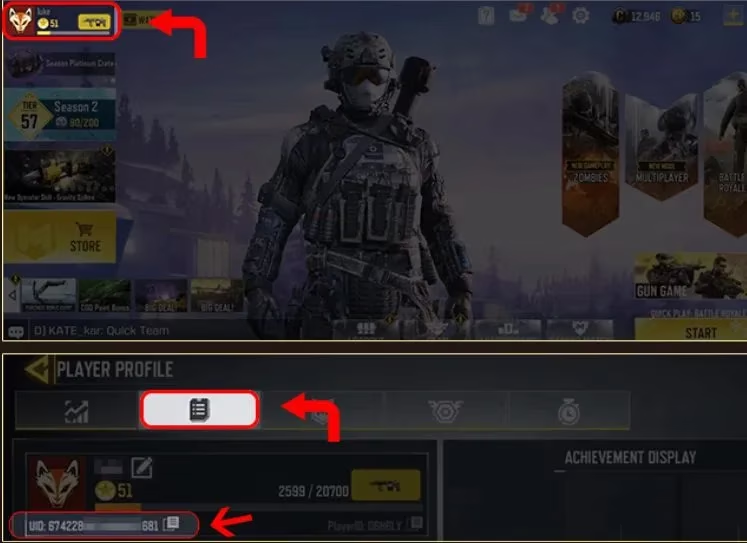
I’ve made the mistake of confusing my username with the UID before, and trust me, that leads to a headache. Double-check every digit.
Step 2: Visit the Official Redemption Page
You’ll need to access the COD Mobile Redemption Center. Back in 2020 it had a dedicated URL, but now it’s integrated into the game’s event tab or accessible via the official website’s support section. Look for “Redeem Code” or “Promo Code” in the in-game events; if you can’t find it, a quick community search will point you toward the right portal. No third-party sites—stick to the official Activision page.
Step 3: Enter Your Details
On the redemption page:
-
UID field: Type or paste your UID.
-
Redeem code field: Enter exactly BFNGZCZ5EM (all caps, no spaces).
-
Verification captcha: Complete the robot check. This usually asks you to select images or solve a simple math problem.
Click submit, and you should see a confirmation message if the code is valid. If you get an error, try refreshing the page or double-checking your UID. A few friends had to attempt it a couple of times before it went through, likely due to server sync delays.
Step 4: Claim Your Emote In-Game
After successful redemption, the emote isn’t automatically added to your loadout. Head to your in-game mailbox (accessible from the main lobby). You’ll see a message containing the BiSH emote. Tap “Claim” and then equip it in your emote wheel. That’s it! You’re now ready to show off 🕺
Some Nitty-Gritty Details I Learned Along the Way
-
Server Restrictions: The code seems to work mainly on global and Garena versions. If you’re on the Chinese version or using a heavily restricted VPN, it might fail. I tested it on a standard North American account.
-
Time Sensitivity: Because codes get deactivated without warning, don’t wait. I’d grab it the moment you finish reading this.
-
Epic Rarity But Zero Cost: It still blows my mind that a premium emote can be obtained for free. Most Epic items require crates or battle pass tiers, so this is a genuine steal.
Why This Emote Means More in 2026
Call of Duty Mobile has evolved so much—new maps, modes, and operators keep the game fresh. Yet, having a legacy cosmetic like BiSH feels like carrying a small piece of history into every match. I’ve had random teammates ask, “How did you get that?!” and it always starts a fun conversation. Plus, in a year where the meta revolves around fast movement and stylish finishers, a quick emote can be the perfect mental reset between intense gunfights.
If you manage to redeem it, drop me a virtual salute in your next lobby. And if the code is already dead by the time you try, keep an eye on anniversary events—developers love reviving old exclusives. Now, go make some noise with BiSH! 🎉